
Taskpane, Companion, data connections and optional AI and XBRL services.
Intito Agentic Disclosure Management (ADM) brings IBM Planning Analytics data into PowerPoint and Word. It combines a familiar Office interface with a companion application on your Windows computer, connecting to the Planning Analytics environment selected by your organization.
Components and reporting flow
The Office add-in lets you select reporting objects, apply filters and refresh your document. The local ADM Companion handles connections and prepares content for Office. A local sign-in component supports the connection experience.
Intito delivers the add-in application over HTTPS. Standard Planning Analytics reporting requests run from your workstation to your configured data environment; the Intito hosting website does not process those cube queries.
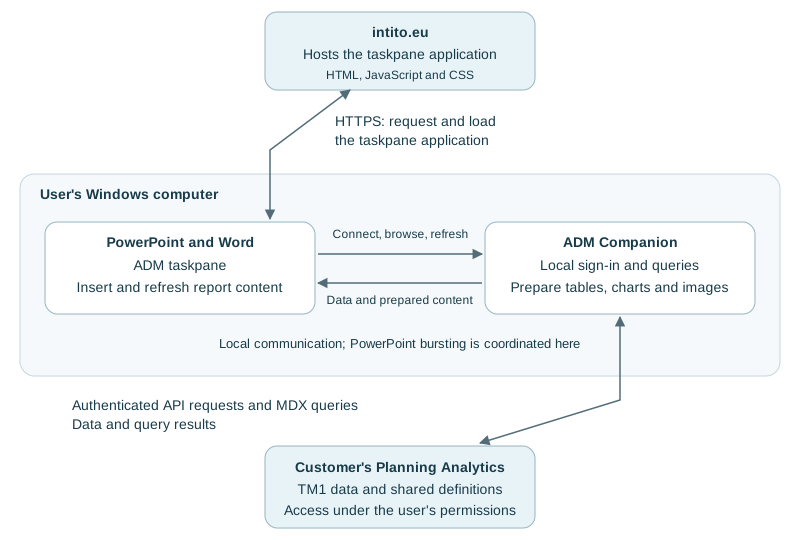
Access follows your existing permissions
You connect using your organization's Planning Analytics sign-in. Source permissions govern the data available to your account. ADM roles distinguish using shared reporting objects from creating definitions and managing access.
Refreshing a report retrieves data for its selected context. Writing changes back to Planning Analytics is a separate action and requires the appropriate access.
Saved document content
Tables, text and charts are saved in your PowerPoint presentation or Word document, ready for your normal review and sharing process. Shared object definitions and model guidance are maintained in your connected Planning Analytics environment.
Saved reports contain the data included at the time of their last update. Apply your organization's normal document permissions and sharing policies when distributing them.
Optional AI assistance
AI assistance uses the provider configured for ADM. When used, prompts and relevant model or reporting context are sent to that provider. Your organization can choose an approved provider and determine which information is appropriate to use with AI.
See AI assistant and model guidance for the available workflows.
XBRL reporting in Word
The XBRL edition adds tagging, report-package generation and local ESEF validation to Word. Tags stay with the document, and report packages are generated locally. Taxonomy resources may require network access.
See Word XBRL tagging and export for the reporting workflow.
Supported deployment and assistance
Your administrator can provide the appropriate installer, connection settings and access for your environment. Keep ADM and its supported Office environment up to date.
ADM records operational errors to assist troubleshooting. Detailed diagnostics are disabled by default and can be enabled for a support investigation. See contacting support for help with an issue.